Designing a Mobile Workforce Management System for real-time scheduling and payroll

Designing a Mobile Workforce Management System for real-time scheduling and payroll

Designing a Mobile Workforce Management System for real-time scheduling and payroll

Workforce Management Mobile App

VCS HR

0 1 Design

0 → 1 Design

Redesign

Redesign

Overview

Overview

Company

Company

Company

Enterprise

Enterprise

SaaS

SaaS

VCS HR is a workforce management platform that provides integrated payroll, time tracking, scheduling, and HR solutions to help organizations streamline operations, improve employee engagement, and reduce costs.

Target clients: Public service agencies (police departments, township municipalities, fire departments, hospitals, universities, and more), and large companies.

Project

Project

Project

VCS HR's Workforce Management Mobile Application is a mobile application within the VCS HR ecosystem that enables employees and supervisors to manage schedules, time tracking, requests, and payroll in real time.

Target user: Administrators, Supervisors, Employees

Function: This product extends core functionality from VisualTIME and VisualPAY into a unified mobile experience, allowing critical workforce actions to happen in the field rather than at a desktop.

Timeline

June 2024 - June 2025

UX/UI Design

Julie DiMemmo

Project Manager

David L.

Developers

Savannah Y.

Hunter B.

My Role

  • I owned the end-to-end design of the VCS HR Mobile Application, translating complex scheduling, time tracking, and payroll workflows into a mobile-first experience. The project was primarily 0 → 1, with approximately 90% of screens designed from the ground up and the remaining 10% thoughtfully redesigned from existing systems.

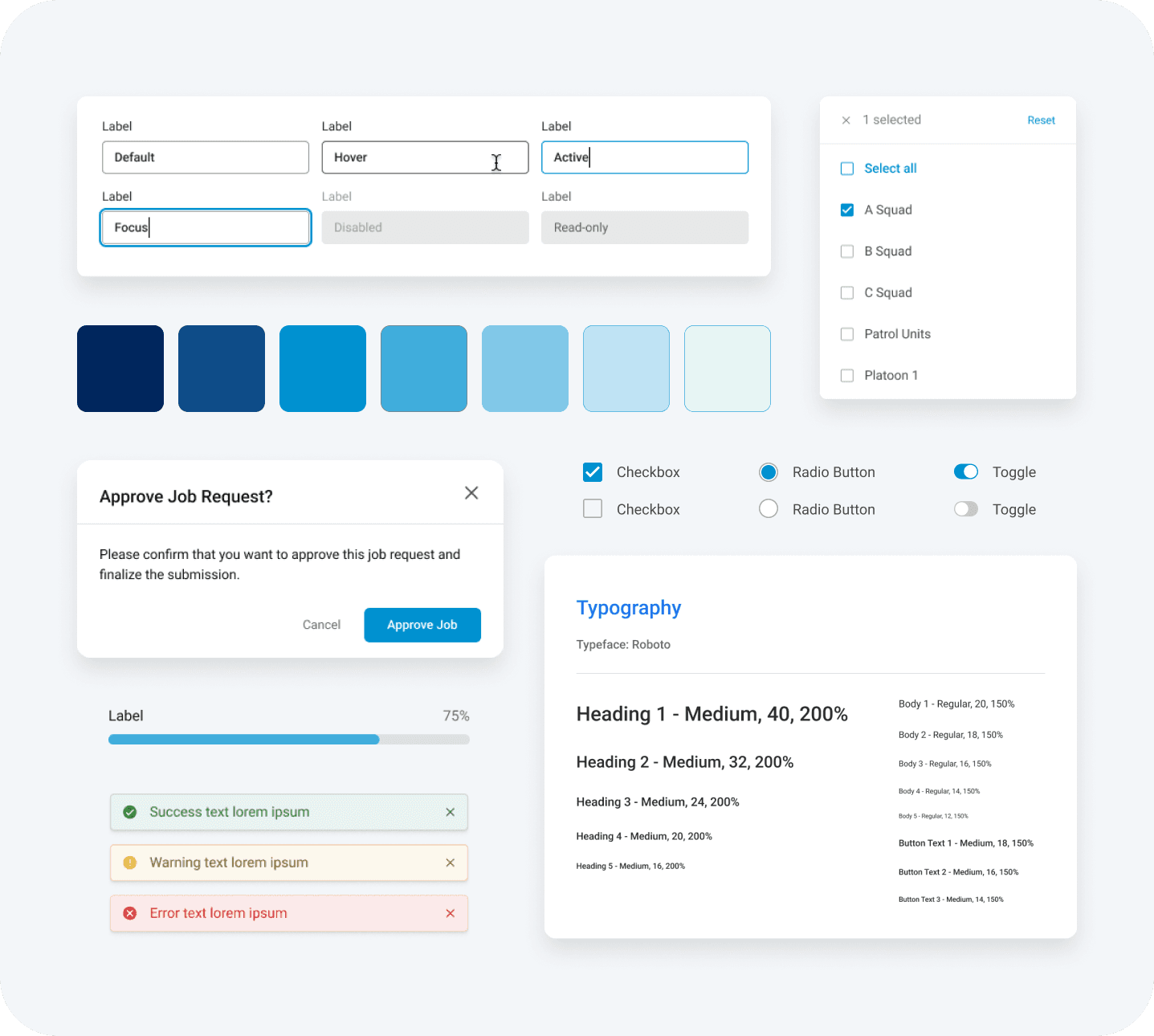
  • My work included defining mobile-specific workflows, restructuring information architecture for high-frequency, in-the-field use, and creating streamlined interactions that balance speed with accuracy. I also adapted the Maverick Design System for mobile, ensuring consistency across the platform while introducing patterns optimized for real-time actions and constrained interfaces.

Highlights

600+

Enterprise Clients

15

Workflows Redesigned

98

0 1 Workflows Designed

148.5%

Increase in Conversion

Problem

Problem

Problem

01

Desktop-Bound Tools

Critical actions required desktop access, limiting flexibility and slowing work.

Heuristics Violated:

Flexibility & efficiency of use, Match between system & real world

Heuristics Violated: Flexibility & efficiency of use, Match between system & real world

02

Delayed & Fragmented Workflows

No real-time access caused delays and administrative bottlenecks.

Heuristics Violated:

Flexibility & efficiency of use, User control & freedom

Heuristics Violated: Flexibility & efficiency of use, User control & freedom

03

Low Visibility of Vital Information

Critical data wasn’t immediately visible, reducing confidence and accuracy.

Heuristics Violated:

Visibility of system status, Recognition rather than recall

Heuristics Violated: Visibility of system status, Recognition rather than recall

04

High-Stakes Error Risk

Dense interfaces increased cognitive load and error risk on mobile.

Heuristics Violated:

Error prevention, Aesthetic & minimalist design

Heuristics Violated: Error prevention, Aesthetic & minimalist design

Solution

01

Desktop-Bound Tools

Enable mobile access to schedules, time, and approvals.

02

Delayed & Fragmented Workflows

Enable real-time, in-context actions to remove delays.

03

Low Visibility of Vital Information

Surface real-time data clearly, at a glance.

04

High-Stakes Error Risk

Design for clarity, validation, and error prevention.

Design Goals

01

Enable immediate action from anywhere

Prioritize high-frequency tasks (clock in/out, submit time, approvals) so users can complete critical actions in seconds without navigating through multiple screens.

02

Make schedules, time, and pay status instantly visible

Surface real-time, high-value information at the top level so users can quickly verify shifts, hours worked, and payroll details without digging through the system.

03

Reduce friction in high-frequency workflows

Streamline core actions by minimizing steps, removing unnecessary inputs, and designing flows that align with quick, in-the-field interactions.

04

Maintain accuracy and trust in a constrained interface

Design clear, deliberate interactions with strong validation, confirmations, and feedback to prevent errors in high-stakes payroll and scheduling actions.

Scope

Scope

Scope: This was a full system redesign for mobile, not a feature port.

The project was primarily 0 → 1, with approximately 90% of screens designed from the ground up and the remaining 10% thoughtfully redesigned from existing systems.

The application needed to support:

  • Real-time schedule access

  • Clock-in/out and time entry

  • Leave and adjustment requests

  • Timesheet review and payroll visibility

  • Supervisor approvals and oversight

The complexity came from translating dense, rule-driven desktop workflows into fast, interruptible mobile interactions—without breaking compliance, auditability, or backend constraints.

Workflow Ecosystem Map

Highlights

Highlights

Highlight Reel

Information Architecture - Before & After

Login Screen - Before & After

Research

Research

Research

I worked closely with stakeholders and developers to analyze how scheduling and payroll workflows from VisualTIME and VisualPAY were actually used in the field, focusing on where delays and friction occurred in real-world scenarios. I also reviewed support issues and usage patterns to identify breakdowns in speed, access, and clarity.

A key insight: workforce management is highly time-sensitive. Actions like clocking in, submitting time, or approving requests are often done under time pressure, making speed and immediacy more critical than feature depth. Designing for quick, interruptible interactions became a primary focus.

Another key finding was that user confidence is directly tied to visibility. Employees and supervisors needed immediate access to accurate schedules, time status, and payroll information. When this data wasn’t easily accessible, users relied on manual checks or delayed actions, increasing both friction and uncertainty.

Research Findings

01

Critical actions are delayed without immediate access

Clocking in, submitting time, and approving requests are often postponed when users are away from a desktop, creating bottlenecks and slowing down time-sensitive workflows.

02

Key information is frequently checked but not easily accessible

Users regularly look for schedules, hours worked, and balances, but struggle to locate them quickly, leading to frustration and repeated navigation.

03

Core workflows are overly complex for simple tasks

Actions like submitting time or requesting leave require too many steps, making routine interactions inefficient—especially in mobile, time-constrained contexts.

04

Trust in the system depends on data visibility

Users rely on seeing accurate, real-time schedule and payroll data to feel confident in the system; when visibility is limited, they resort to manual verification or delay actions

Insights

Design

Design

Turning the Home Screen into an Action Hub

Problem

Users had to navigate multiple screens to complete simple, high-frequency tasks.

Solution

  • Designed an action-first dashboard

  • Surfaced current shift status, schedule, and primary actions (clock in/out, requests)

  • Prioritized immediate interaction on app open

Outcome

Core tasks can be completed in seconds without navigation overhead.

Example

Home Dashboard (Employee View)

Designing for “Read First, Act Second”

Problem

Users were forced into actions without enough context, increasing errors in time and payroll entries.

Solution

  • Structured flows to prioritize review before commitment

  • Provided clear summaries before submission

  • Reinforced actions with confirmations and status feedback

Outcome

Reduced errors and increased user confidence in high-stakes workflows.

Example

Time Entry Review Screen (Before Submission)

Simplifying Complex Workflows for Mobile

Problem

Desktop workflows were too dense and multi-step for mobile interaction.

Solution

  • Reduced workflows to essential inputs only

  • Used progressive disclosure to reveal detail only when needed

  • Eliminated unnecessary fields and decisions

Outcome

Complex actions (e.g., submitting time, requesting leave) became fast and manageable on mobile.

Example

Request Time-Off Flow

Creating Real-Time Visibility Across the System

Problem

Schedules, time status, and payroll data were not easily accessible, leading to uncertainty and manual follow-up.

Solution

  • Surfaced key data across all primary views

  • Designed clear summaries for time, balances, and pay

  • Ensured consistency between views (schedule, time, payroll)

Outcome

Users can quickly verify their status without navigating deep into the system.

Example

Schedule Screen

Enabling Fast Supervisor Decision-Making

Problem

Approval workflows were delayed due to lack of mobile access and poor visibility into request details.

Solution

  • Designed approval queues with clear summaries

  • Enabled quick approve/reject actions

  • Provided drill-down access to supporting context

Outcome

Supervisors can process requests quickly, reducing bottlenecks.

Example

Approval Queue (Supervisor View)

Preventing Errors Through Feedback and Validation

Problem

Mistakes in time entry or approvals have real consequences, but mobile interfaces increase the risk of accidental actions.

Solution

  • Added confirmations for critical actions

  • Designed clear success and error states

  • Reinforced system status after every interaction

Outcome

Users understand exactly what happened after each action, reducing ambiguity and risk.

Example

Clock-Out Confirmation + Success State

Collaboration

The project required tight alignment with engineering due to shared backend systems (VisualTIME/VisualPAY).

Key collaboration areas:

  • Mapping desktop workflows to mobile-compatible interactions

  • Working within existing data models and business rules

  • Ensuring real-time performance for actions like clock-in and approvals

  • Adapting Maverick design system components for mobile use

Design decisions were continuously validated against technical constraints to ensure feasibility without compromising usability.

Key Decisions & Tradeoffs

Tradeoff: Feature completeness vs usability

Not all desktop functionality was included. Prioritized high-frequency, high-value actions over parity.

Constraint: Existing backend architecture

Workflows had to align with established rules and data structures, limiting simplification in some areas.

Decision: Action-first over navigation-first design

Reduced navigation depth in favor of immediate task completion.

Outcomes

Outcomes

Results

Immediate access to critical workflows

Users can check schedules, submit time, and take action from anywhere without delay.

Faster task completion

High-frequency actions (clock-in, approvals) reduced to seconds.

Improved confidence in payroll and scheduling

Real-time visibility into data reduces uncertainty and manual verification.

Reduced administrative friction

More self-service and faster approvals decrease bottlenecks.

Better supervisor efficiency

Approval workflows are streamlined, enabling quicker decision-making.

Learnings

Mobile design requires prioritization, not translation

Replicating desktop systems creates friction. Focusing on essential actions leads to better outcomes.

Visibility is as important as functionality

Users trust systems they can see and verify, even if the underlying logic hasn’t changed.

High-frequency workflows define the experience

Optimizing the most common actions has the greatest impact on usability and adoption.

Constraints drive clarity

Working within backend and mobile limitations forced sharper decisions about what truly matters.

Looking Ahead

The mobile app establishes a foundation for real-time workforce management within the VCS HR ecosystem.

Future opportunities include:

  • Expanded supervisor tools and analytics

  • Offline support for field environments

  • Deeper payroll insights and reporting

  • Continued refinement of high-frequency workflows

By focusing on speed, clarity, and trust, the system transforms how scheduling and payroll are managed in the field—shifting from delayed, desktop-bound processes to immediate, mobile-first interactions.